
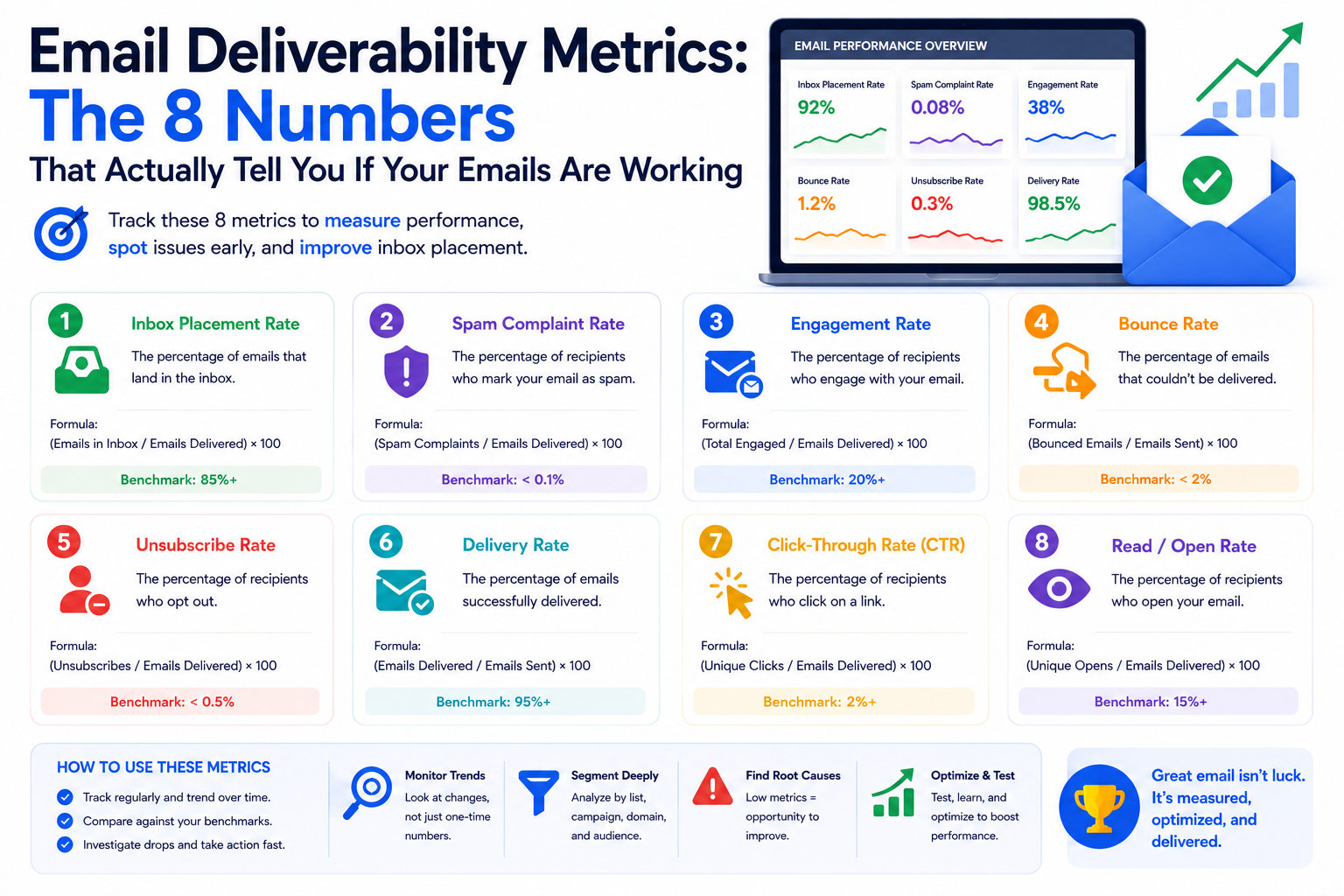
Most email marketers track open rates and click rates. These are engagement metrics, and they matter — but they sit at the surface of your email program. They tell you what happens when people see your emails. They tell you nothing about whether those emails are reaching the inbox in the first place.
Email deliverability has its own set of metrics, and they operate underneath the engagement layer. When these numbers are healthy, your engagement metrics have a chance to reflect your content quality. When they are not healthy, your open rates and click rates are depressed by an invisible deliverability tax that no amount of subject line testing will fix.
Here are the eight deliverability metrics that every email sender should be tracking, what each one tells you, and what the right benchmarks look like in 2026.
This is the most important deliverability metric and the one most senders do not track. Inbox placement rate is the percentage of your delivered emails that land in the recipient's primary inbox rather than their spam folder, junk folder, or promotions tab.
Benchmark: Above 90% is strong. Below 80% indicates a significant problem. Below 70% is a deliverability crisis.
How to measure it: Inbox placement rate cannot be measured from your ESP's dashboard — your ESP only reports on delivery, not placement. You need inbox placement testing tools like GlockApps, Litmus, or our complimentary inbox placement test to see where your emails are actually landing across major providers.
Your delivery rate is the percentage of emails that were accepted by the receiving mail server — meaning they were not bounced. This is different from inbox placement rate and is frequently misread as a deliverability measure.
Benchmark: Healthy email programs run above 97 to 98%. Anything below 95% indicates significant list quality or infrastructure problems.
What it misses: A 99% delivery rate can coexist with a 50% inbox placement rate. Delivery tells you the email reached the server. It says nothing about whether it reached the inbox. Do not use delivery rate as a substitute for inbox placement measurement.
Hard bounces happen when you send to an email address that does not exist, has been permanently disabled, or actively rejects your domain. Every hard bounce is a permanent failure that should immediately result in suppression of that address.
Benchmark: Keep hard bounces below 2% per campaign. Top performers keep hard bounces below 1%. Above 2% is the threshold where ISPs start applying additional scrutiny to your sending domain.
What causes it: Invalid addresses from poor list hygiene, contacts who have changed jobs and whose corporate email no longer exists, and imported lists that were never validated. Our email list management guide covers the right validation and cleaning approach.
Your spam complaint rate is the percentage of recipients who mark your email as spam. This is the most damaging single metric for your sender reputation. Every complaint registers directly against your sending domain and IP in Gmail's and Yahoo's systems.
Benchmark: Gmail considers 0.10% a warning threshold and 0.30% critical. Top-performing senders keep complaint rates below 0.05%. A complaint rate above 0.10% requires immediate investigation.
How to track it: Google Postmaster Tools shows your spam rate as seen by Gmail specifically — this is the most authoritative source of complaint rate data for Gmail. Your ESP may show complaint data from ISP feedback loops, but coverage varies by provider.
Your domain reputation is the score that Gmail, Outlook, and Yahoo assign to your sending domain based on your historical sending behavior. This score determines how much trust inbox providers extend to your emails before they analyze content or other signals.
How to check it: Google Postmaster Tools shows your Gmail domain reputation on a four-point scale: High, Medium, Low, or Bad. Microsoft SNDS shows equivalent data for Outlook. Both are free and should be checked weekly for active email programs.
Benchmark: You want to operate at High with Gmail. Medium is watchable. Low requires active intervention. Bad means Gmail is actively filtering your emails and recovery will take weeks of careful sending.
This metric shows what percentage of your emails are passing SPF, DKIM, and DMARC authentication checks. A pass rate below 100% means some of your emails are going out without proper authentication, which creates both deliverability and security vulnerabilities.
Benchmark: Should be at or extremely close to 100% for all three protocols for the sending streams you have configured authentication for. Anything meaningfully below 100% indicates a broken or missing record that needs to be found and fixed.
How to check it: Google Postmaster Tools shows authentication rates for Gmail. For other providers, inbox placement testing tools like GlockApps report authentication results alongside placement data.
Soft bounces are temporary delivery failures — a full inbox, a temporarily unavailable server, a message that was too large for the recipient's mailbox. Unlike hard bounces, soft bounces do not immediately disqualify an address. But repeated soft bounces to the same address often indicate that something permanent has changed and the address should eventually be suppressed.
Benchmark: Isolated soft bounces are normal and manageable. A spike in soft bounces — particularly from a specific provider — often indicates a block or deferral at the server level and should be investigated immediately.
Your list growth rate (new subscribers added) minus your churn rate (unsubscribes plus suppressed addresses) tells you whether your active subscriber base is growing or shrinking. This is not traditionally considered a deliverability metric, but it is deeply relevant to long-term deliverability health.
A list that is growing through high-quality organic acquisition, combined with active suppression of unengaged contacts, produces naturally healthier deliverability metrics over time. A list that is growing through low-quality bulk acquisition while inactive contacts accumulate will show deteriorating deliverability metrics even if nothing about your sending behavior changes.
Tracking these eight metrics gives you a complete picture of your email program's health at every layer — from technical authentication to recipient behavior to long-term list quality.
If any of these metrics are outside acceptable ranges and you want a comprehensive diagnosis and remediation plan, a Formula Inbox email deliverability audit covers all eight of these dimensions and gives you a clear action plan. Talk to our team to get started.

Cold email deliverability is getting harder in 2026. Learn proven strategies to set up your domain, warm up your inbox, and land cold emails where they belong.

Your email sender reputation decides whether emails reach the inbox or vanish into spam. Learn how to check your sender score and improve domain reputation fast

Learn exactly how to set up SPF, DKIM, and DMARC records step by step. Stop emails landing in spam and protect your domain from spoofing in 2026.
Our highly experienced email deliverability managers consistently help clients achieve inbox placement rates (IPR) of more than 90% by uncovering and resolving the issues that keep messages from their intended recipients. Are you ready to do the same?