
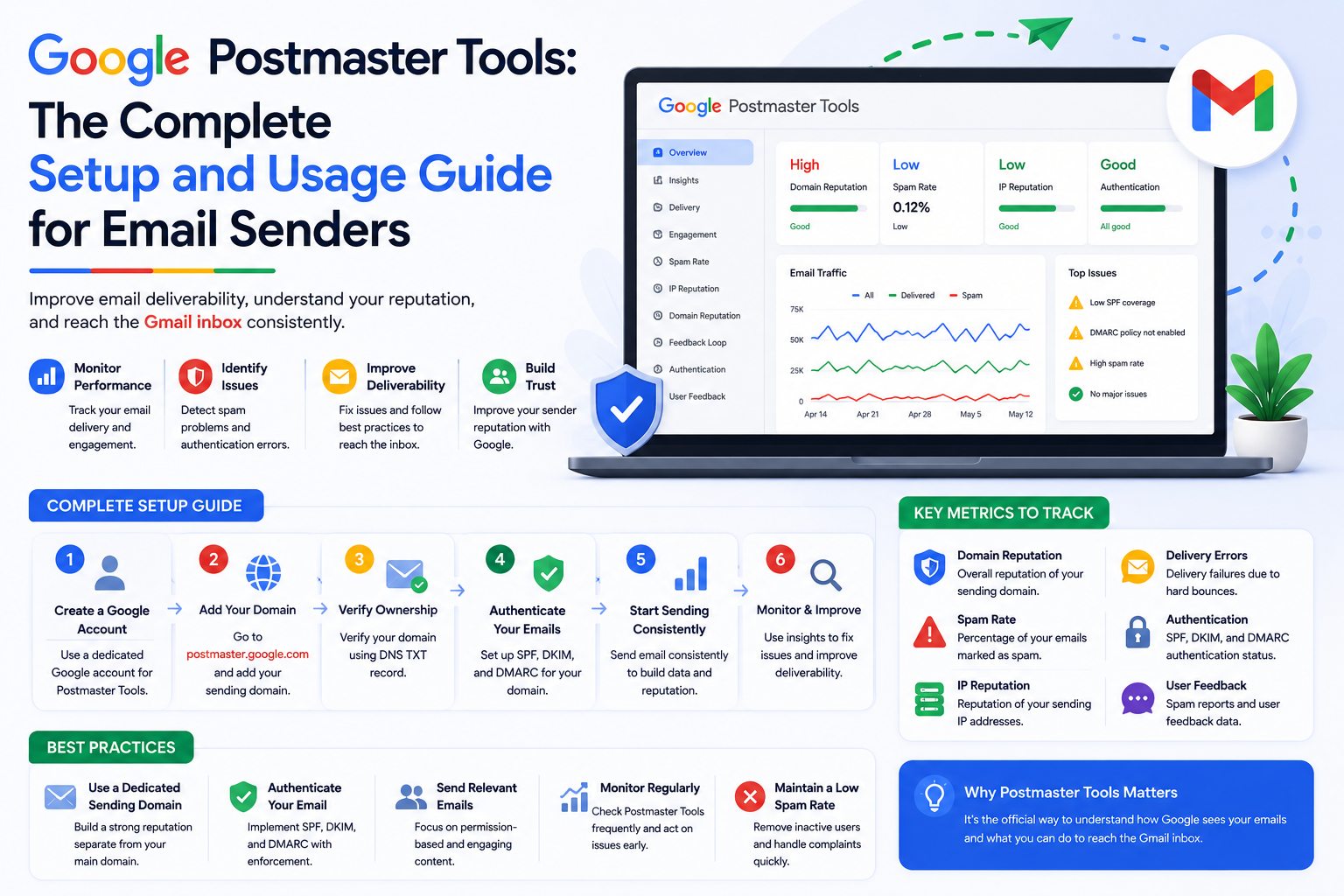
There is a free tool available to every email sender that gives you direct insight into how Gmail perceives your sending domain — including your domain reputation score, your spam rate as measured by Gmail, your authentication pass rates, and your IP reputation data. It is called Google Postmaster Tools, and most email marketers have never set it up.
This is one of the most consistently overlooked resources in email deliverability. The data it provides is not an estimate or a third-party approximation. It is Gmail's own data about your sending domain, updated daily. If you are not using it, you are operating your email program without one of the most useful feedback instruments available. This guide shows you exactly how to set it up and what to do with the data once you have access.
Domain Reputation is the most important dashboard in Postmaster Tools. It shows you how Gmail rates your sending domain on a four-point scale: High, Medium, Low, or Bad. High reputation means Gmail treats your emails with maximum trust. Bad reputation means Gmail is actively filtering your emails. Most healthy email programs operate at High or Medium. If you are at Low or Bad, your inbox placement with Gmail is seriously compromised.
The Spam Rate dashboard shows the percentage of your emails that Gmail users are marking as spam. This is the most precise complaint rate data available for Gmail specifically, and it aligns directly with Gmail's published thresholds: above 0.10% triggers warnings, above 0.30% is critical. Monitoring this metric weekly is essential for protecting your domain reputation.
Authentication shows you what percentage of your emails are passing SPF, DKIM, and DMARC checks as seen by Gmail. If you see anything other than near-100% pass rates for emails you have configured authentication for, something in your setup is broken.
IP Reputation shows reputation data for your sending IP addresses specifically. This helps you identify whether reputation problems are at the domain level or the IP level — an important distinction for diagnosing and fixing deliverability issues.
Setting up Postmaster Tools requires you to verify that you control the domain you want to monitor. The process takes about 15 minutes and requires access to your domain's DNS settings.
Go to postmaster.google.com and sign in with a Google account. Click the plus icon to add a new domain. Enter your sending domain — the domain that appears in the From address of your emails. Google will display a TXT record value that you need to add to your domain's DNS settings to prove ownership. Go to your DNS provider, add a new TXT record with the name and value Google provides, and wait for DNS propagation (usually 15 minutes to a few hours). Return to Postmaster Tools and click Verify. Once verified, your domain will begin showing data within 24 to 48 hours, assuming you are sending enough volume for Gmail to generate statistics.
Note: Postmaster Tools shows data only for domains sending sufficient volume to Gmail recipients. If you are a very low-volume sender, some dashboards may show insufficient data even after setup.
Check your Domain Reputation score weekly at minimum. If you see a reputation drop from High to Medium, investigate immediately — what changed in your sending behavior in the past two to three weeks? A drop from Medium to Low requires immediate action: reduce sending volume, suppress unengaged subscribers, and review your complaint rate data. A drop to Bad is a crisis that requires stopping most sending and executing a systematic recovery plan.
Watch your Spam Rate trend more than the individual data points. A single day with a slightly elevated spam rate may be statistical noise. A trend of rising spam rates over two or three weeks is a signal that something structural needs to change — usually list hygiene or the relevance of what you are sending to your audience.
If your Authentication dashboard shows anything less than near-complete SPF and DKIM pass rates, treat it as an urgent technical issue. Every email that fails authentication is a missed opportunity for positive reputation building and a potential negative signal to Gmail's filtering systems.
Google Postmaster Tools is an invaluable resource, but it has important limitations. It only shows you Gmail data. It does not tell you how Outlook, Yahoo, or Apple Mail are treating your emails. It does not show you inbox placement rates — only reputation ratings and complaint rates. And it requires a minimum sending volume to generate useful data.
For a complete picture of your deliverability health across all major providers, you need to combine Postmaster Tools data with Microsoft SNDS data for Outlook, inbox placement testing tools for provider-by-provider placement rates, and blacklist monitoring for your sending IPs and domains. Our ongoing deliverability support and monitoring service integrates all of these data sources and monitors them continuously on your behalf.
Google Postmaster Tools is the most direct window into how Gmail sees your sending domain. If you have not set it up yet, do it today. The data it provides is worth more than most paid monitoring tools for Gmail-specific insights.
After setting up Postmaster Tools, if you see reputation data that concerns you or want help interpreting what the numbers mean for your specific program, Formula Inbox's team is available to help. And if you want a comprehensive assessment of your deliverability health beyond what Postmaster Tools shows, start with a full email deliverability audit.
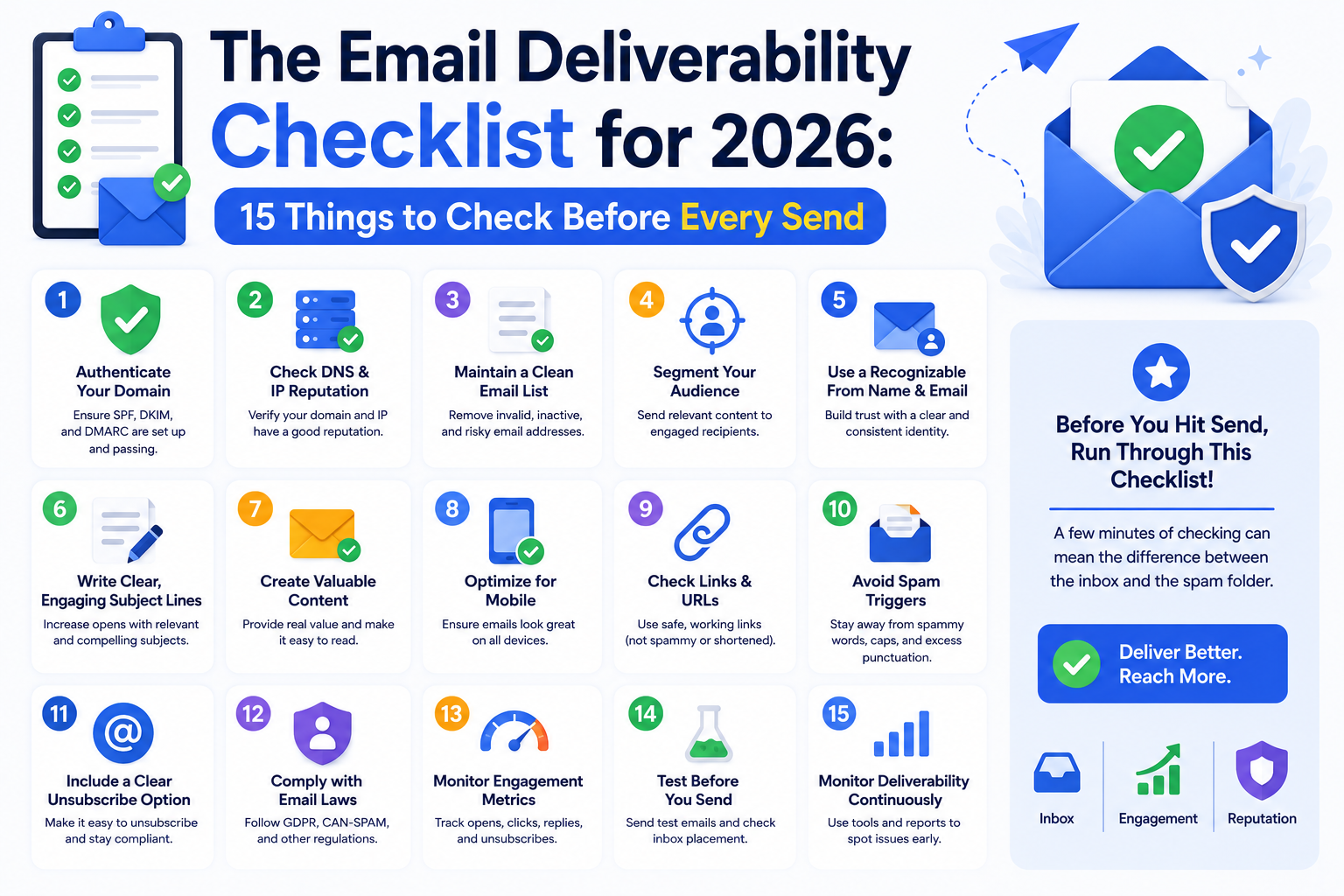
Use this complete email deliverability checklist to verify every critical factor before you hit send. Authentication, list health, content, and reputation — all
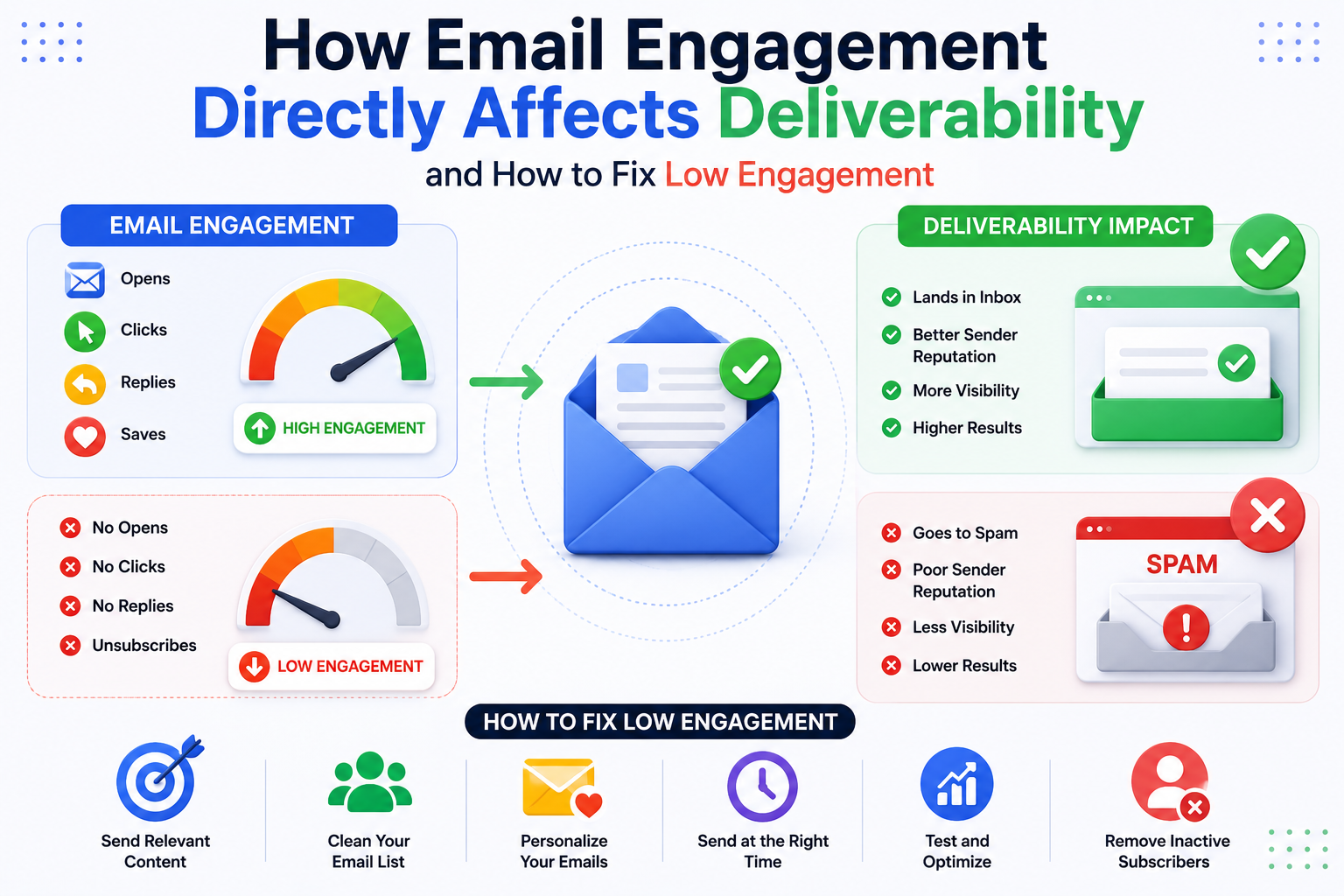
How Email Engagement Directly Affects Deliverability and How to Fix Low Engagement
Google Postmaster Tools gives you direct visibility into how Gmail sees your sending domain. This complete guide shows you how to set it up, read the data, and
Our highly experienced email deliverability managers consistently help clients achieve inbox placement rates (IPR) of more than 90% by uncovering and resolving the issues that keep messages from their intended recipients. Are you ready to do the same?