
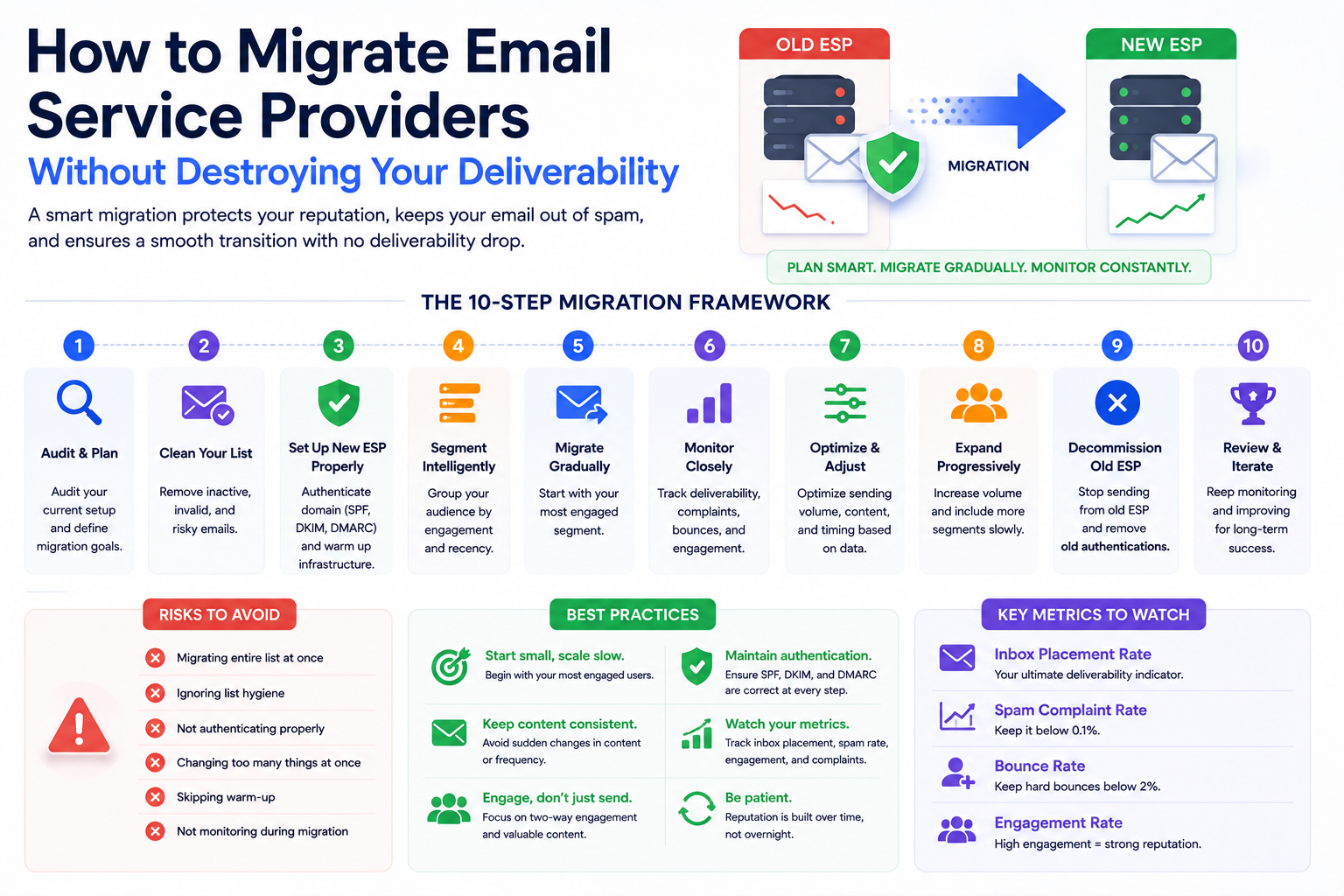
Switching your email service provider is one of the most consequential decisions you can make for your email program — and one of the most common reasons for serious deliverability crises. A migration done well preserves your inbox placement throughout the transition. A migration done carelessly can damage your sender reputation in ways that take months to repair and cost substantial revenue while you recover.
This guide covers every step of an ESP migration from a deliverability perspective: what to prepare before you move, how to execute the transition safely, and how to validate that your deliverability is intact on the other side.
Your current inbox placement depends on a combination of factors that are tied to your current ESP: your sending IP addresses (which carry their own reputation history), your authentication configuration (SPF, DKIM, and DMARC records pointing to your current platform), and your sending patterns as recognized by inbox providers over time.
When you switch ESPs, you change all three simultaneously. Your new ESP assigns you different IP addresses — possibly shared, possibly dedicated, but in either case without the reputation history your old IPs had. Your authentication records need to be updated to point to the new platform. And your sending patterns change because a different infrastructure is now handling your emails. From the perspective of Gmail, Outlook, and Yahoo, a significant portion of what made you a trusted sender has just been reset.
This is why ESP migrations without proper planning so often result in deliverability drops. It is not that the new ESP is worse than the old one. It is that the reputation signals that supported your inbox placement were specific to your old configuration and did not transfer automatically.
Audit your current deliverability baseline: Run a full inbox placement test on your current ESP before the migration so you have a documented benchmark to compare against afterward. Check Google Postmaster Tools and SNDS for your current domain and IP reputation. Run your sending domain and IPs through MXToolbox blacklist check. Understand your current state completely before changing anything.
Document your sending infrastructure: List every sending domain, subdomain, and IP address you currently use. Map which email types — marketing, transactional, automated flows — are sent from which domains. This documentation is your migration blueprint.
Clean your list before migrating: Migration is the best time to do a thorough list cleaning because you are starting a new reputation on new IPs. Remove hard bounces, suppress unengaged contacts who have not opened in 90 days, and run your list through email validation. Bringing a clean list to your new ESP gives you the best possible foundation for the new infrastructure.
Our email list hygiene guide covers the right cleaning approach. And if you want a comprehensive view of your current deliverability health before migrating, a Formula Inbox email deliverability audit documents your baseline across every critical dimension.
Even if you are moving a large, healthy list to a reputable new ESP, you cannot immediately send at your full volume from your new infrastructure. The new IPs have no reputation history with Gmail, Outlook, or Yahoo. Jumping from zero to your full send volume on day one is one of the most reliable ways to trigger spam filtering.
You need to warm up your new IP addresses and sending domain exactly as you would with a brand new email program. Start with your most engaged subscribers — people who open and click consistently — at low volumes. Increase gradually over four to six weeks. Monitor your Postmaster Tools data closely throughout the warm-up. Scale back immediately if complaint rates or reputation signals move in the wrong direction.
Our email infrastructure services include migration planning with structured warm-up schedules tailored to your specific list size, audience composition, and sending frequency.
Every sending domain and subdomain you use with your new ESP needs fresh authentication configuration. This means new DKIM keys generated by and installed for the new platform, an updated SPF record that includes the new ESP's sending infrastructure, and verification that your DMARC policy still functions correctly with the new configuration.
Do not assume that your existing authentication records will work with the new ESP. They almost certainly will not without updates. The DKIM keys from your old platform are not valid for your new one. The SPF record needs to be updated to include the new platform's sending servers. Test authentication after updating records and before sending any real campaigns through the new infrastructure.
If you are migrating multiple sending domains across different teams or brand segments, do this authentication work for every domain. One improperly configured domain will fail silently and you will see inexplicably poor deliverability from that specific stream without knowing why.
Once your warm-up is complete and you are sending at full volume on your new ESP, compare your deliverability metrics against the pre-migration baseline you established. Inbox placement rates across Gmail, Outlook, and Yahoo should be equal to or better than pre-migration. Domain reputation in Postmaster Tools should be at the same level or above. Bounce rates and complaint rates should be comparable to your historical averages.
If any metric is meaningfully worse than your baseline three to four weeks after full migration, something in the migration introduced a deliverability problem. Common culprits: authentication not fully configured for all sending streams, warm-up executed too aggressively, or list cleaning that was insufficient and brought bad addresses to the new ESP.
An ESP migration is a fresh start for your sending infrastructure. Done right, it is an opportunity to rebuild your email foundation more cleanly than it was before. Done carelessly, it is months of deliverability recovery work.
Formula Inbox provides expert-led ESP migration support that covers every deliverability dimension: pre-migration auditing, warm-up planning, authentication setup, and post-migration monitoring. If you are planning a platform change, talk to our team before you begin to make sure the transition is structured correctly from the start.

Master transactional and sales email deliverability. Learn how to keep order confirmations, receipts, and sales outreach out of spam — with proven strategies fo

Master email warming techniques to protect your domain and ensure your messages reach the inbox. Learn how to avoid common mistakes related to email warming.

Avoid common mistakes that could significantly hurt email deliverability. Discover the best practices that ensure that your emails land in the inbox.
Our highly experienced email deliverability managers consistently help clients achieve inbox placement rates (IPR) of more than 90% by uncovering and resolving the issues that keep messages from their intended recipients. Are you ready to do the same?