What Does an Email Deliverability Audit Include?
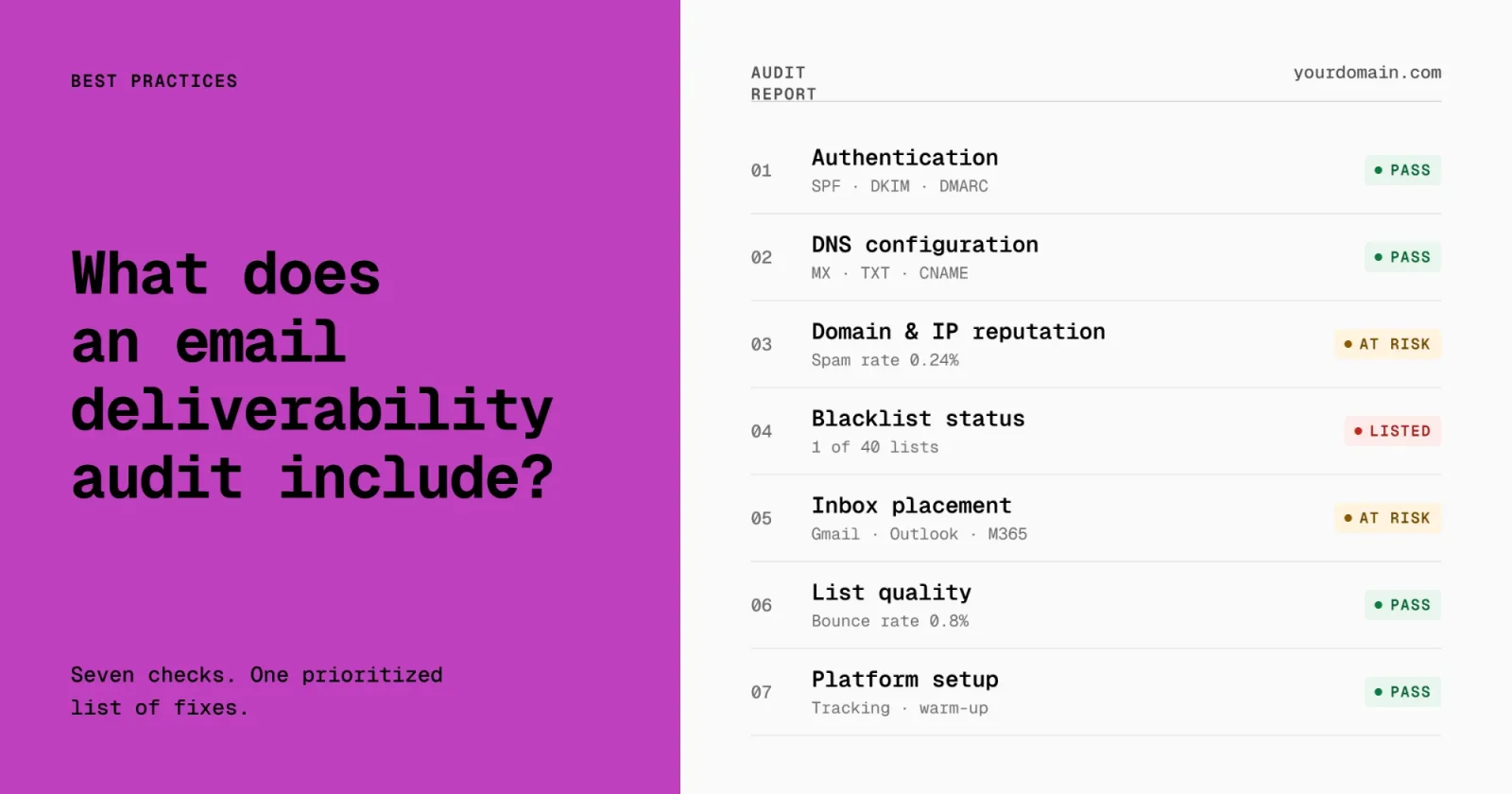
An email deliverability audit finds out why your email is landing in spam, or not arriving at all, and tells you exactly what to fix. A good audit checks seven things: authentication, DNS, sender reputation, blacklists, inbox placement, list quality, and how your sending platform is set up. It ends with a prioritized list of fixes, not a score.
This guide covers what each part of an audit looks at, how to run a basic version yourself, and when it makes sense to bring in a deliverability consultant.
When do you need a deliverability audit?
Most teams ask for an audit after something breaks. Open rates drop suddenly, replies dry up, a customer says your emails are in their junk folder, or a campaign starts bouncing.
You also need one before something breaks:
- Before you move to a new email platform
- Before you scale cold outbound or add new sending domains
- After Google, Yahoo or Microsoft change their sender rules
- When you have never checked your setup since it was first built
What an email deliverability audit checks
1. Authentication: SPF, DKIM and DMARC
Authentication proves to mailbox providers that your email really comes from you. An audit confirms that SPF lists every service that sends on your behalf, that DKIM signs your mail with your own domain, and that DMARC is published and aligned.
Gmail and Yahoo require all three from bulk senders. Google defines a bulk sender as anyone sending close to 5,000 or more messages a day to Gmail accounts. Google's sender guidelines and Yahoo's sender best practices spell out the rules. Our SPF, DKIM and DMARC setup guide covers how to set each one up.
BIMI, which shows your logo in the inbox, is checked too if you use it or plan to.
2. DNS configuration
DNS records tell the internet where your mail lives and who is allowed to send it. An audit looks for missing, duplicated or conflicting records, which are common after a website move or a platform switch. See which DNS record identifies an email server for the basics.
3. Domain and IP reputation
Mailbox providers score every sending domain and IP address. A low score sends your mail to spam even when everything else is set up correctly. An audit reviews the reputation data the providers share, such as Google Postmaster Tools, and looks at spam complaint rates.
Google asks bulk senders to keep their user-reported spam rate below 0.1% and never let it reach 0.3%. Our guide to sender reputation explains how to check and repair it.
4. Blacklist status
An audit checks whether your domain or sending IPs are listed on the major blocklists, and if so, which ones matter for your audience. Not every listing affects delivery, so the audit separates the ones that need action from the ones you can ignore. If you are listed, this removal guide walks through getting off.
5. Inbox placement
Authentication and reputation tell you how providers should treat your mail. Placement testing shows how they actually treat it. An audit sends test messages to seed inboxes at the major providers, including Gmail, Google Workspace, Outlook.com and Microsoft 365, and checks business email filters such as Microsoft EOP, Proofpoint, Mimecast and Barracuda.
Placement is reported by provider, because a problem at Microsoft rarely looks the same as a problem at Gmail.
6. List quality and engagement
Who you send to matters as much as how you send. An audit reviews bounce rates, complaint rates, engagement trends, how addresses are collected, and how inactive contacts are handled. A list full of old or unverified addresses drags down reputation no matter how clean the technical setup is. See the email deliverability metrics worth tracking.
7. Platform and sending setup
The last part of an audit looks at your email platform or sequencer itself: sending domains, volume, sending patterns and warming. For cold outbound programs, it also covers how domains and mailboxes are separated from your main company domain, so a cold campaign cannot damage the mail your team sends every day.
What you should get at the end
An audit is only useful if it tells you what to do next. Expect three things:
- A written report that explains each finding in plain language
- A prioritized fix list, ordered by impact, that any competent team can follow
- A review call to walk through the findings and answer questions
Be wary of an audit that ends with a single score and no specific fixes. A score tells you something is wrong. It does not tell you why.
Can you audit your own deliverability?
Yes, a basic version. Here is a starting checklist:
- Look up your SPF, DKIM and DMARC records and confirm all three exist
- Check that every tool that sends email for you is included in SPF
- Set up Google Postmaster Tools and check your spam rate
- Run your domain through a blacklist checker
- Send a test campaign to seed inboxes and see where it lands
- Review your bounce and complaint rates for the last 90 days
Our email deliverability checklist goes into more detail, and the free deliverability assessment runs a live placement test and checks your authentication and blacklist status in a few minutes.
A self-check catches the obvious problems. It is harder to see how the pieces interact: why mail passes authentication but still lands in spam at Microsoft, or why one program drags down another. That is where an expert audit earns its cost.
When to hire someone for an audit
Consider a professional audit when:
- Placement is falling and you cannot find the cause
- The problem is specific to one provider, such as Outlook or Microsoft 365
- You send cold outbound, marketing and transactional email from the same domain
- Email drives enough revenue that a few weeks of guessing costs more than the audit
Formula Inbox runs email deliverability audits for any platform, with a written report and review call within 7 to 10 business days of getting access to your systems.
Frequently Asked Questions
How long does an email deliverability audit take?
A thorough audit usually takes one to two weeks. Most of that time goes into collecting reputation data and running placement tests across providers. Ours takes 7 to 10 business days from when we receive access to your systems.
How much does an email deliverability audit cost?
Prices vary with the size and number of sending programs. Formula Inbox audits start at $2,499. See pricing for details.
Does an audit fix the problems it finds?
An audit is a diagnosis. It tells you what is wrong and in what order to fix it. Fixing the issues is a separate step, which you can do in-house or with help.